

Bitdefender rolled out new functionality in Bitdefender GravityZone, a unified cybersecurity platform that provides prevention, protection, detection, and response capabilities for organizations of all sizes. These features, consistent with our multi-layered security strategy, are intended to ease the workload of security analysts, administrators, and users.
What’s new for Security Analysts
In a dynamic cybersecurity landscape, security analysts uncover signs of sophisticated attacks and make the invisible visible. This section describes new functionality designed to elevate analysts' capabilities, offering enhanced tools for threat detection, investigation, and response.
GravityZone PHASR for AI Agents
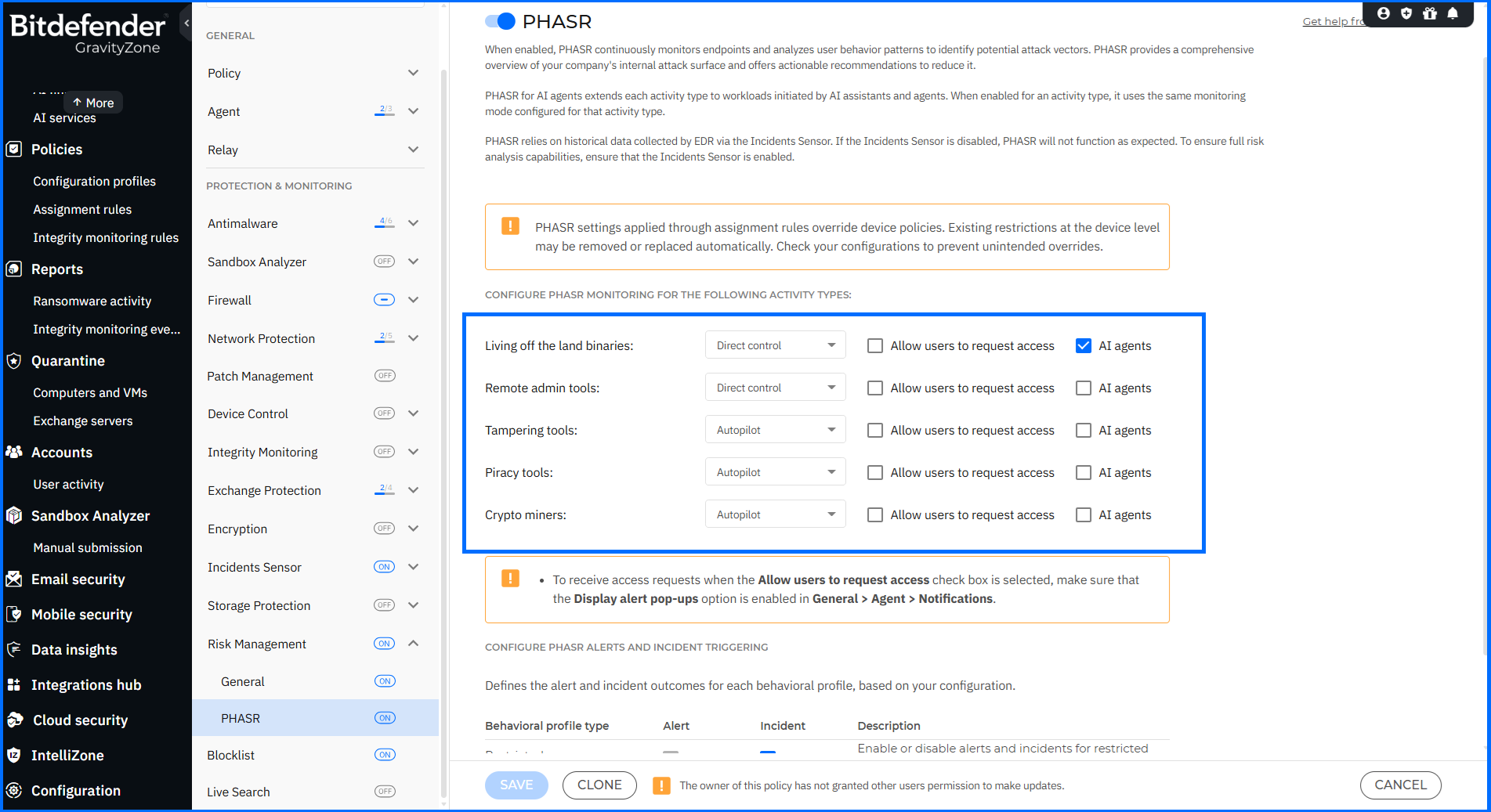
Behavioral analysis and access control now extend to AI agents. Until now, an agent inherited the PHASR rules of the endpoint user it ran. An AI agent may need PowerShell to browse, execute tasks, or complete an automated workflow, while the person at the endpoint holds a role with no need for PowerShell at all. Granting the agent that access would extend it to the user, increasing the human attack surface.
PHASR for AI separates the two. Each AI agent is treated as a behavioral profile — an identity — independent of the user operating the endpoint, with its own permissions, restrictions, and attack surface. The AI agent gains access to the tools required to perform its tasks, while user permissions remain strictly tied to the user's role.
For supported license configurations, administrators can enable AI agent protection, distinguish AI agents from standard users, receive AI agent recommendations, and manage AI agent behavioral profiles.
PHASR Manual Override in Autopilot Mode
In Autopilot mode, PHASR applies restrictions automatically from its behavioral analysis, and until this release, administrators could not modify those decisions directly. This release adds a manual override.
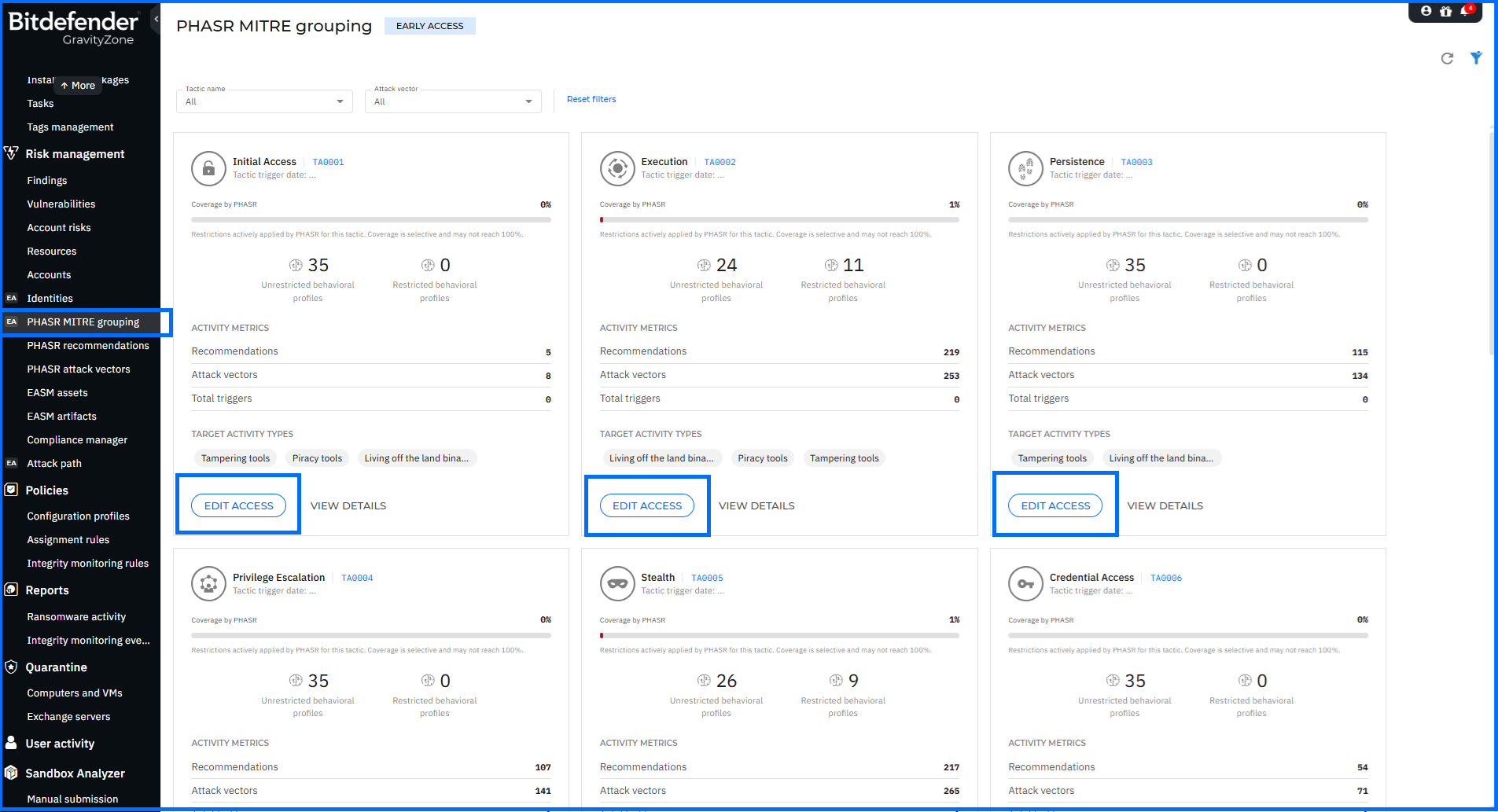
The revised edit access flow pairs attack vector selection with access decisions applied to departments, users, or individual behavioral profiles, displays the impact of a change before it is committed, and now reaches profiles under Autopilot management without switching the activity type to Direct Control.
The revised flow is available in two places:
- In PHASR Attack Vectors, editing works at the rule level.
- In PHASR MITRE Grouping, previously presented events mapped to MITRE Tactics, Techniques, and Sub-techniques as view only. With current update access, it is now possible to manually modify rules, with multiple rules edited in a single operation.
An override holds access for five days, if the tool goes unused in that window, PHASR restores the restriction based on learned behavior. If it is used, the tool passes under PHASR's Autopilot mode, and the restriction returns once usage stops.
For comprehensive insights into PHASR, we invite you to watch our masterclasses here.
Attack Path Enhancements
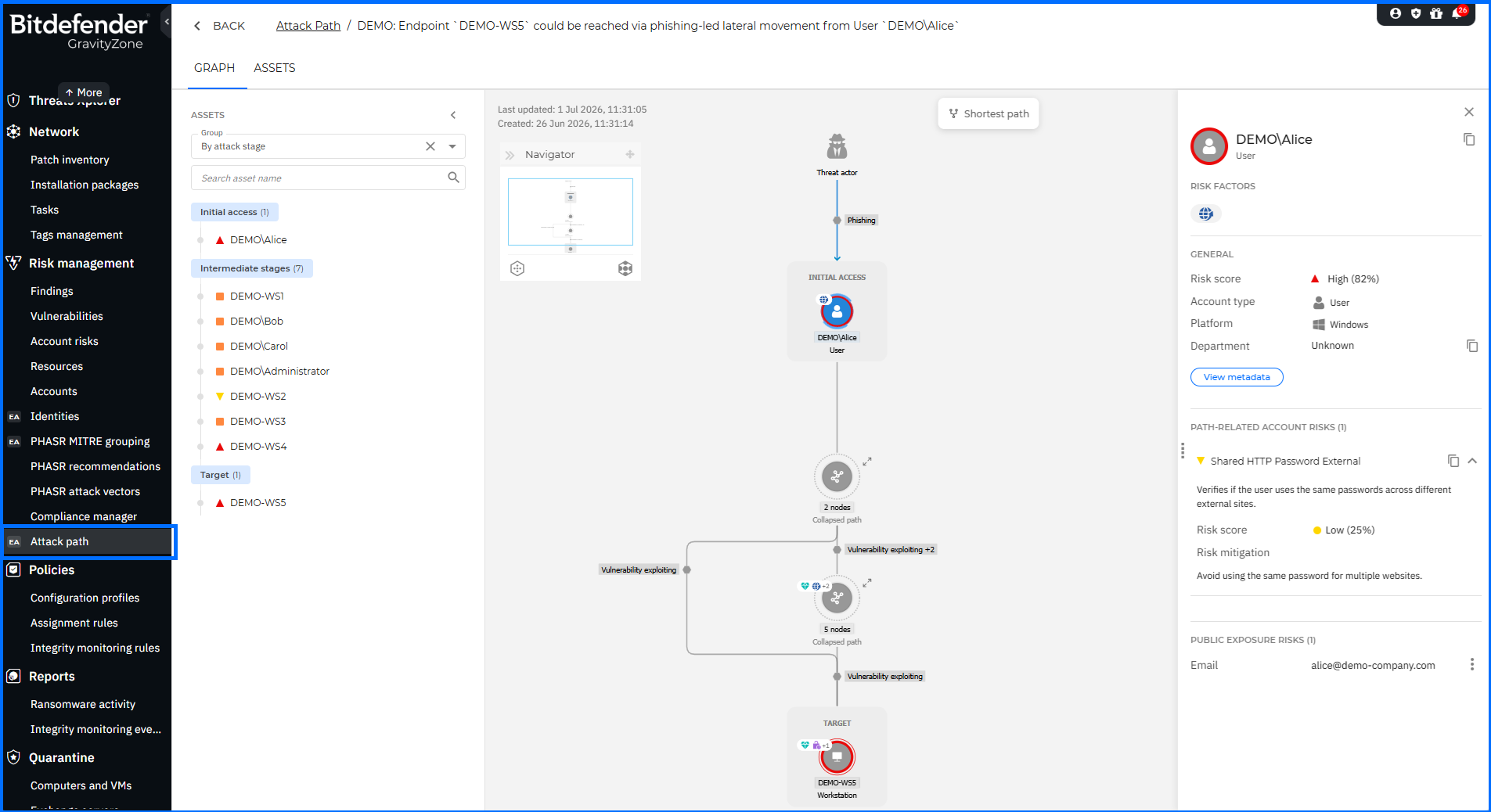
A graph that shows how an attacker reaches a critical target is only as useful as the analyst's ability to move from a node on that graph to the evidence behind it. Attack Path, a Controlled Availability feature introduced in February 2026 (v 6.70), now connects its exposure findings to the corresponding external asset records, alongside a new filtering dimension, a demonstration path, and terminology alignment across the interface. This update covers the following changes:
- Public exposure risk factor. The Internet exposure risk factor has been renamed to Public exposure. Expanding a non-cloud asset in the Assets panel on the attack path graph page now displays a Public exposure risks field, and a matching Public exposure risks section has been added to the node information panel.
- Navigation into EASM. Each item in the Public exposure risks section carries a View EASM assets action that opens the corresponding item in External Attack Surface Management (EASM), which continuously identifies and analyzes internet-facing assets and their vulnerabilities, providing an attacker-centric view of your organization's exposure.
- Asset by position filter. On the main Attack Path page, the Main asset name filter has been renamed to Asset by position and now also filters by where the asset sits on the path — Any on the path, Initial asset, or Target asset — in addition to filtering by asset name.
- Demo attack path. A demonstration path is now present on the main Attack Path page for exploring the feature against sample data. Hide demo attack path in the view options menu removes it from the grid.
XDR and EDR Enhancements
GravityZone Extended Detection and Response (XDR) and Endpoint Detection and Response (EDR) capabilities give security analysts the tools to detect, investigate, and respond to threats across endpoints and broader infrastructure. This update covers five changes across event inspection, incident graph presentation, sensor status reporting, and custom rule configuration.
Historical Events side panel:
In Incidents > Search > Historical events, three changes apply to the Details section:
The TABLE and JSON tabs are now OVERVIEW and ADDITIONAL DETAILS.
A search bar at the top of the OVERVIEW tab locates specific field names and values.
The copy-to-clipboard button has moved from ADDITIONAL DETAILS to the bottom of the panel as Copy as JSON, capturing all event data shown in the panel—general information and Details content —as valid JSON.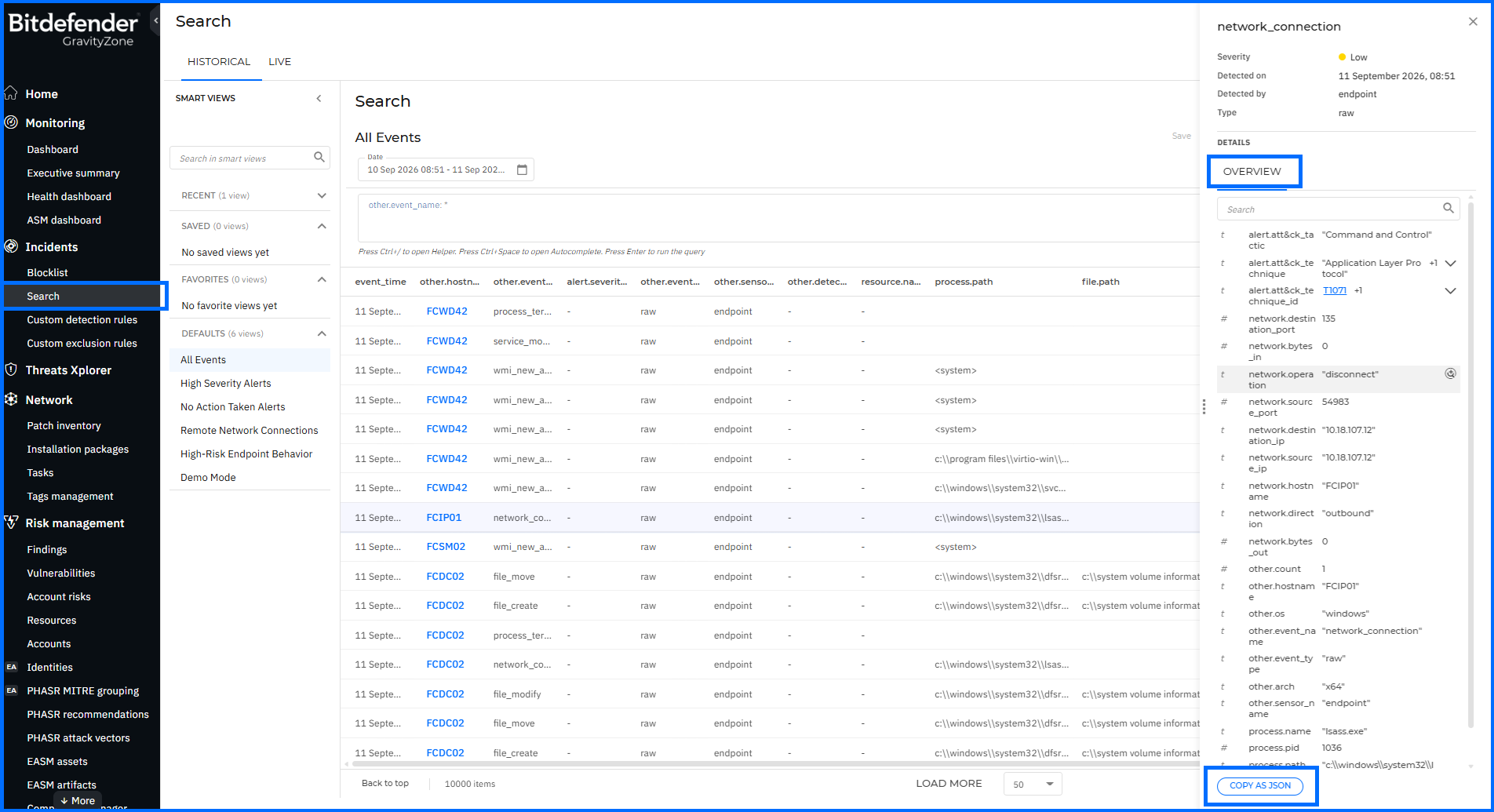
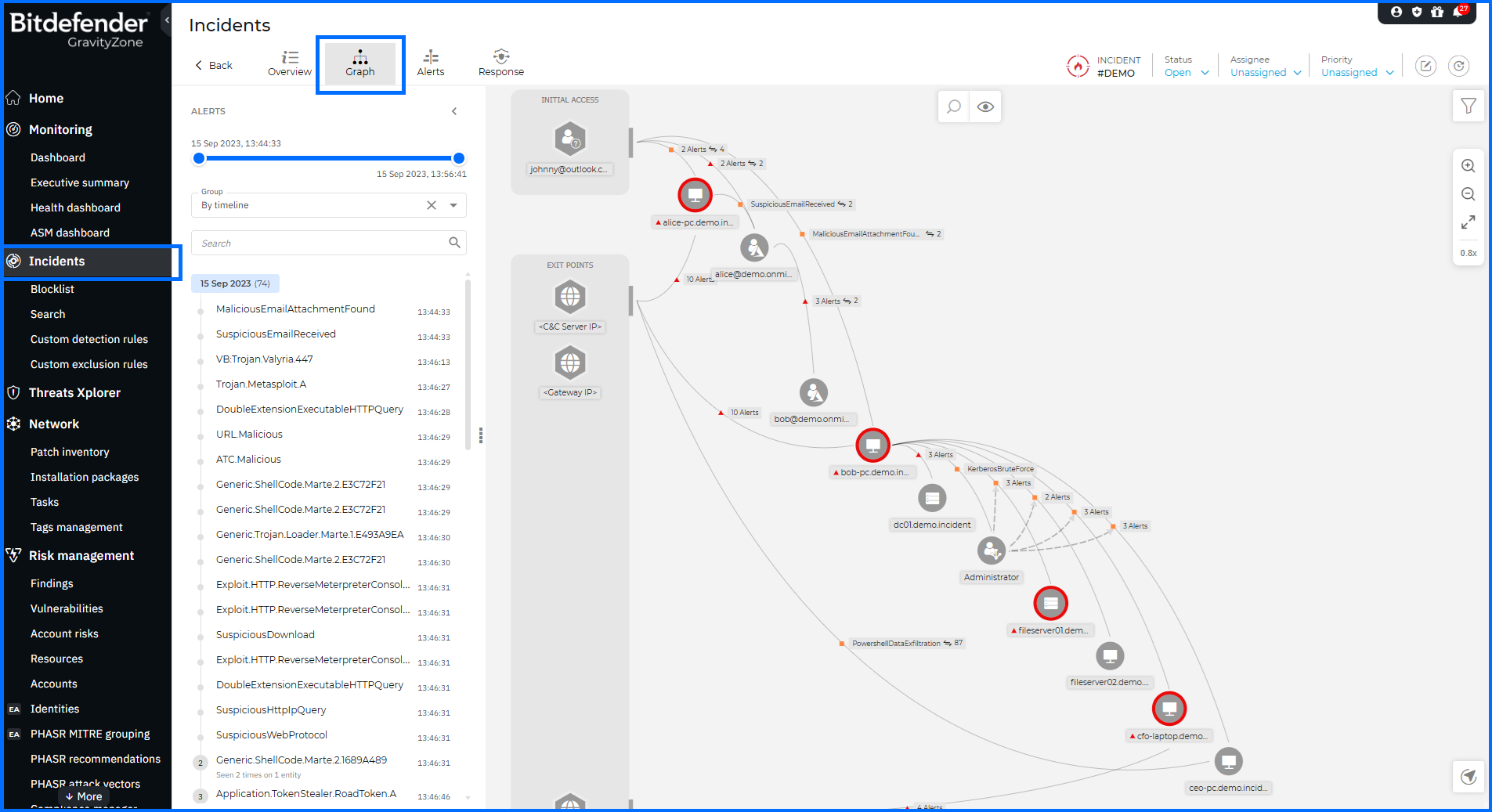
Severity Indicators on XDR Incident Graphs
Nodes and node groups now display a color-coded severity icon: red for High, orange for Medium, and yellow for Low. Node severity reflects the highest-severity alert associated with the node, and node groups inherit the highest severity among their members. Indicators update as incident data changes and are included in incident report PDF exports.
Sensor Integration Status Notifications
Notifications now carry the sensor status, sensor name and type, error details, and remediation guidance, allowing integration failures to be triaged directly from the notification without opening GravityZone Control Center.
Response Status Model
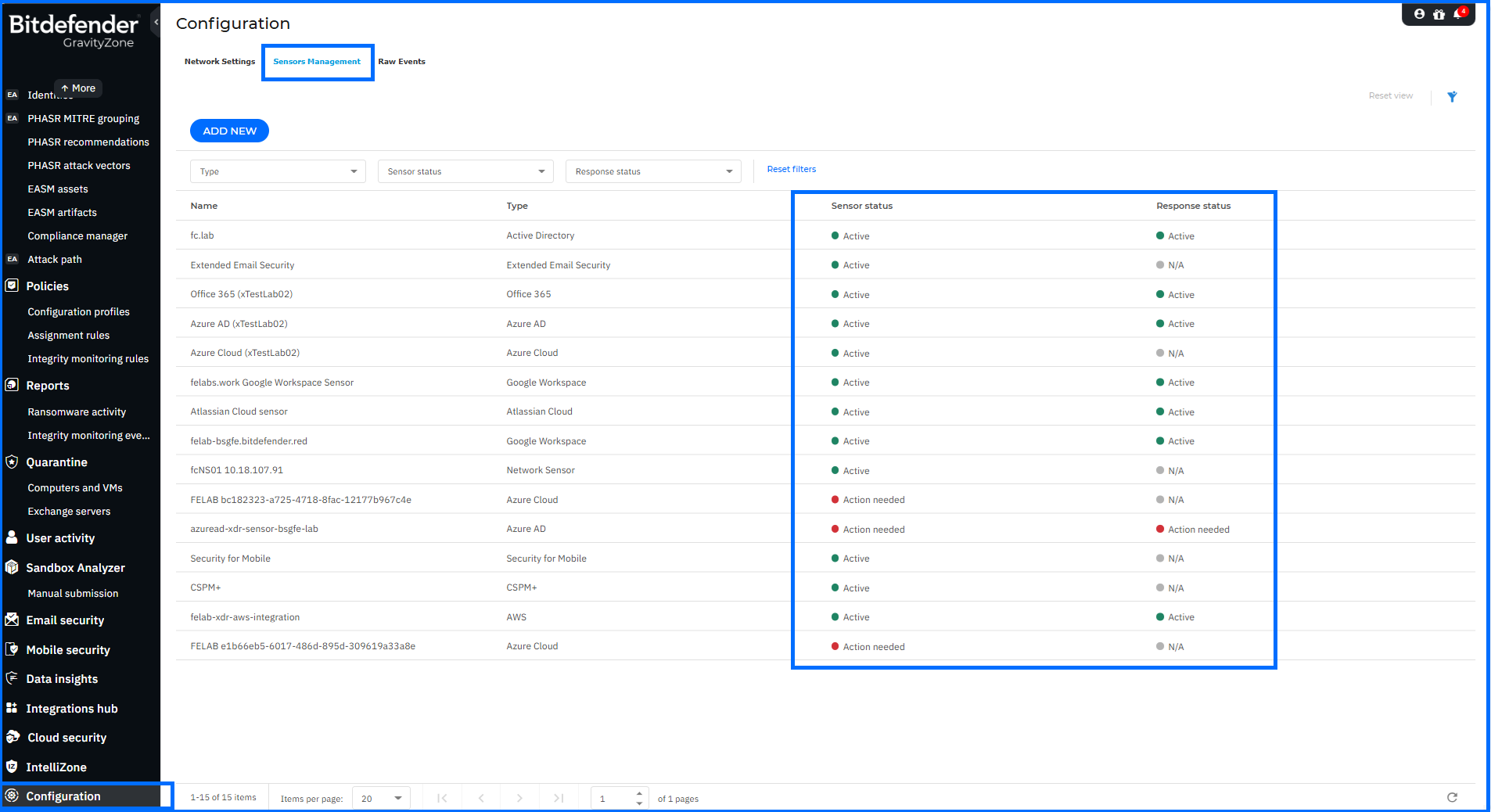
On Configuration > Sensors Management, three statuses replace the retired Unknown and Needs attention values:
-
Not licensed: the sensor license expired or was removed.
-
Action needed: the sensor has connectivity or communication problems.
-
N/A: the sensor does not support response actions.
The Response status filter now reflects this revised set.
Custom Rule Target Loading
Custom detection and exclusion rules load faster due to an optimization in how target companies are retrieved. The Detection rule targets step in the create and edit workflows no longer presents a separate Selected companies list; selections remain visible within the main list.
For comprehensive insights into detection and response with GravityZone EDR and XDR, watch our masterclasses here.
Malware Log Collection
When a log collection task appears in an endpoint's history, the useful question is who started it — the administrator troubleshooting a detection, or the MDR SOC working an investigation the customer has not yet been briefed on. The Gather logs task collects malware infection logs (BDSyslog) from an endpoint, and the implemented update makes it possible to identify the person who initiated the action.
A new Owner column in the Troubleshooting > Activity section of the endpoint details identifies who started the task. Tasks initiated by the MDR Service are shown as MDR Service to customers, while security analysts see the actual initiator. This information is also included in task status events sent to the Event Push Service and in the user activity log.
An administrator reviewing endpoint activity can now separate their own troubleshooting from MDR-initiated collection without correlating timestamps against a service record.
What’s new for Administrators
With administrators constantly juggling numerous tasks and responsibilities, tools designed to make their daily tasks easier are highly appreciated. This section describes new functionality designed to facilitate the management of features responsible for prevention, protection, and detection in a defense-in-depth security architecture.
GravityZone AI Assistant
Answering an operational question about Bitdefender GravityZone has typically meant leaving the console for the Bitdefender Support Center and locating the relevant article. With this update, Bitdefender GravityZone includes the GravityZone AI Assistant build, based on large language models.
A dedicated GravityZone AI Assistant button appears on every page of the GravityZone interface in the top-right corner. Selecting it opens a chat window offering predefined prompt suggestions or accepting a typed question. Prompts submitted while another query is being processed are queued. A navigation menu provides you with chat history and a link to a Usage credits page, where administrators can check their tenant limit and current usage.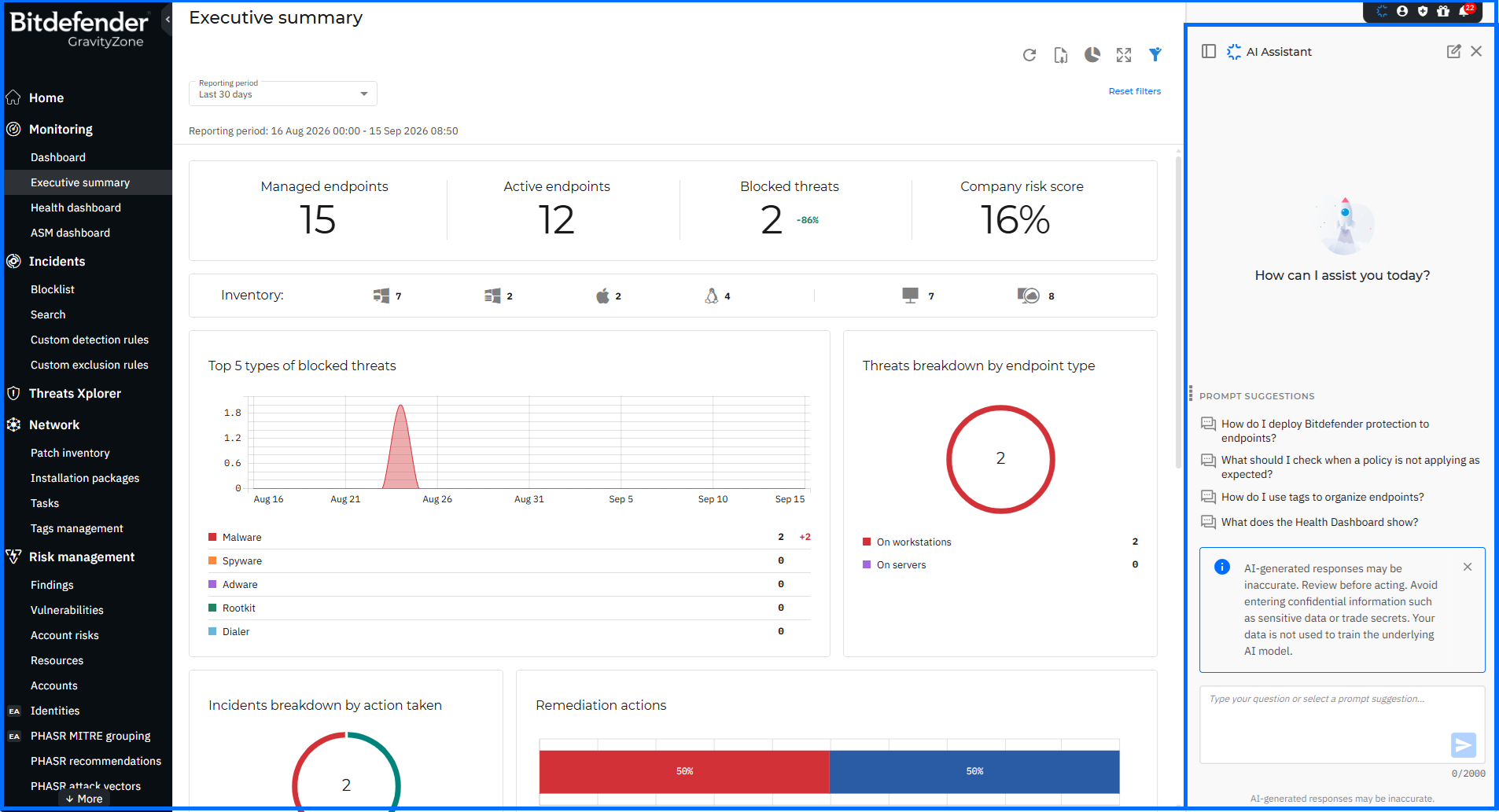
The AI Assistant answers questions about supported workflows, and each response arrives as guidance the administrator can evaluate and apply, with any resulting change recorded in the User Activity log. The assistant reads from two places:
- Product knowledge that covers the GravityZone Knowledge Base and how-to guidance on settings, terminology, alerts, and basic configuration recommendations.
- Data from the GravityZone tenant the administrator is signed in to. Starting with Early Access, tenant data covers three areas:
- Network inventory and endpoints: Answers questions about managed assets and devices using inventory records.
- Policies: Provides configuration details and status for the policies defined in the tenant.
- Incident investigation: Answers questions about incidents using incident data and related context.
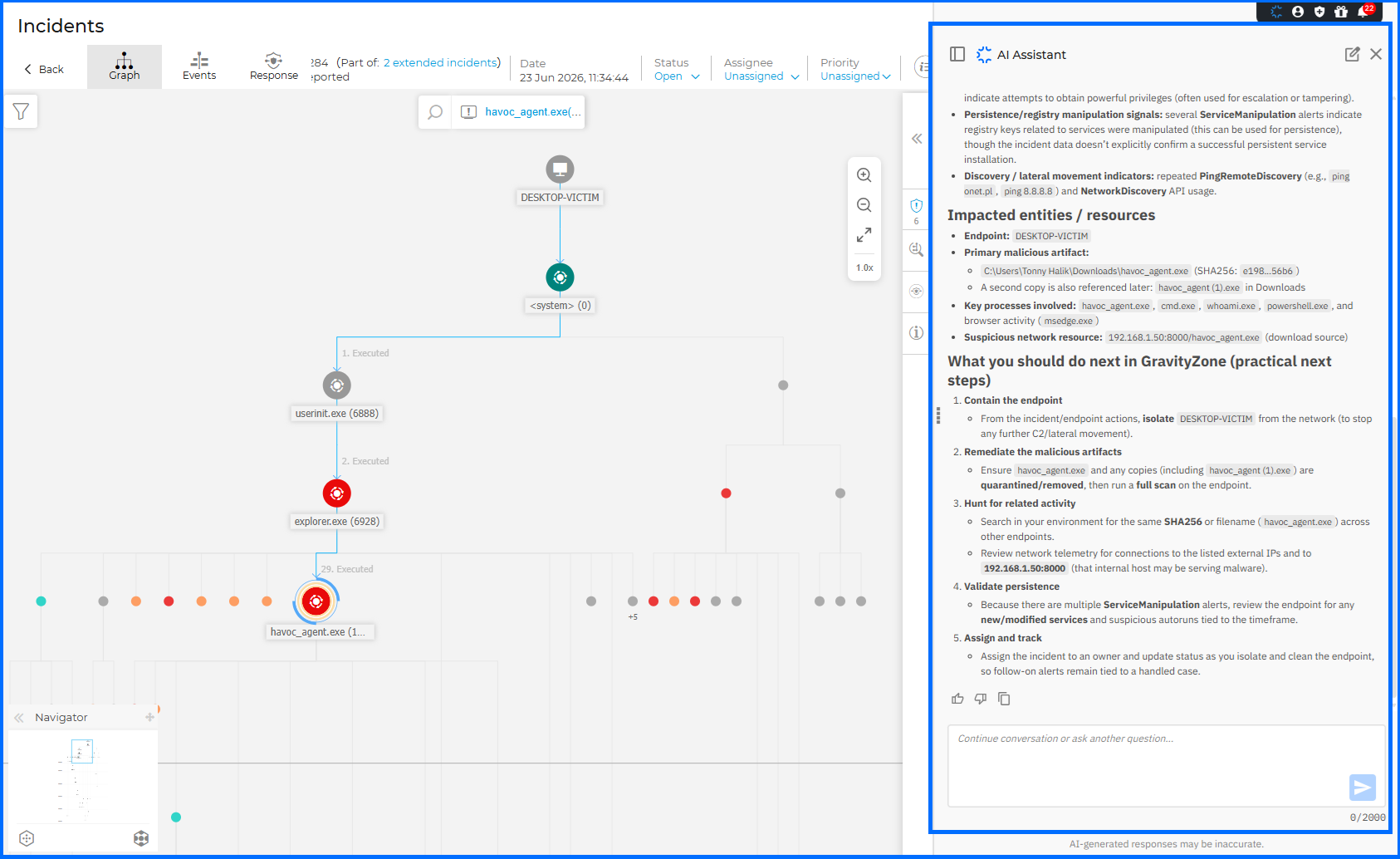 The feature is currently in controlled enrollment. To request access, submit the enrollment form.
GravityZone Node for n8n
Security teams that run response steps across several tools can now drive GravityZone from n8n, a workflow automation platform. Bitdefender publishes and maintains the GravityZone node as a verified n8n community node that models the GravityZone public API, so Control Center actions run as steps inside an n8n workflow.
A workflow begins at an n8n trigger and calls the node wherever a GravityZone action is required: isolate an endpoint from an incident record, push a policy to a group, create a scan or patch task, restore a quarantined file, or pull a report. Credentials are configured once as a GravityZone API key plus the access URL that appears above the API keys section under My Account > API keys, and the key carries only the action categories selected when it was issued, so a workflow cannot reach beyond the scope granted to its credential. Operations are grouped by resource — Network, Incidents, Policies, Quarantine, Patch Management, Packages, Reports, and others — with a Custom operation available for API methods the node does not model directly.
The GravityZone half of a response runbook is configured on the same canvas as the rest: each operation carries its own parameter fields, and retry, branching, and error handling come from n8n itself. The node performs actions only; it carries no trigger, so a workflow starts with an n8n trigger, such as a schedule or a webhook, and calls GravityZone at the step where the action belongs. A Push resource configures the GravityZone push event service from inside that same workflow, including its service type and the event types it sends. The endpoint isolation procedure, which would otherwise require the analyst to open the Control Center, initiates when the trigger condition is met, and the same sequence unfolds identically each time it is executed.
Network Enhancements
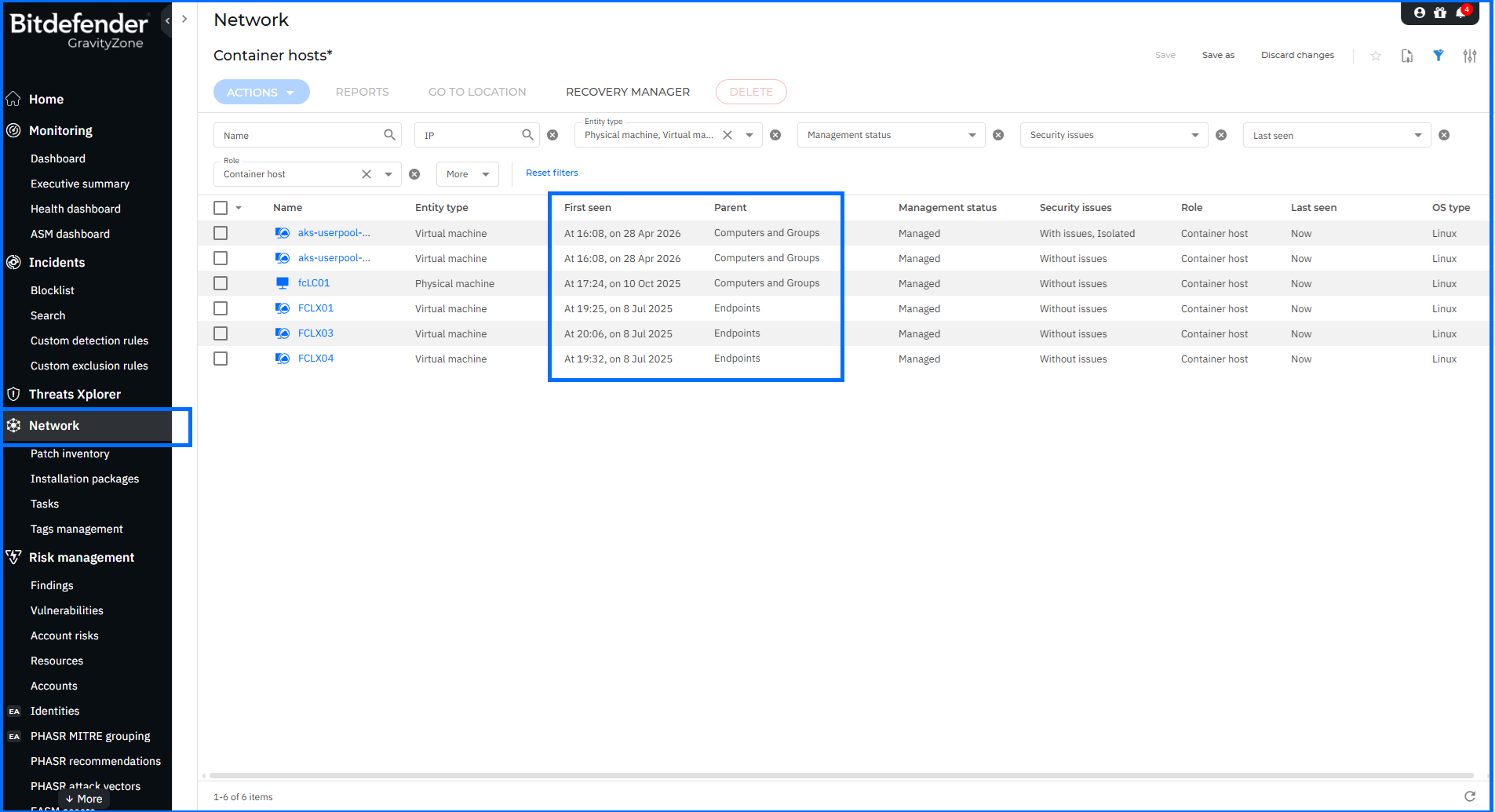
The GravityZone Network inventory gives administrators a consolidated view of all managed endpoints, containers, and network assets across their environment. This release adds two grid columns and one field to the endpoint details panel.
A Parent column on the Network page displays the parent entity of each row, accompanied by a filter that accepts text-based search to locate entities by their parent's name. A First seen column shows the date of first communication for managed endpoints and is sortable, with values pre-populated for all endpoints existing at the time of the update. Both columns are hidden by default and can be enabled through the column selector. In the endpoint details panel, the General tab now displays the Relay ID for virtual machines acting as a Bitdefender Endpoint Security Tools (BEST) relay.
Sorting by the date of first appearance makes it possible to distinguish recently registered endpoints from those registered long ago. This is useful when comparing the inventory against deployment records or identifying assets that appeared outside the planned deployment. Filtering by Parent scopes the grid to a specific branch of the hierarchy by name, while the Relay ID confirms a virtual machine's relay role directly from the details panel.
Security Data Lake Licensing
The Security Data Lake collects data from managed assets, processes the raw input, and indexes it into a searchable format for dashboards and reports, with each organization's data held in a dedicated cluster. This release changes how the product and its MDR counterpart are licensed.
GravityZone Security Data Lake and GravityZone Security Data Lake for Managed Detection and Response (MDR) are now also available independently of Archive and Data Lake storage entitlements. Trial and evaluation — Not For Resale (NFR) — license keys now carry a 15-day grace period.
For comprehensive insights into Security Data Lake, watch our masterclasses here.
MSP Simplified Customer Onboarding
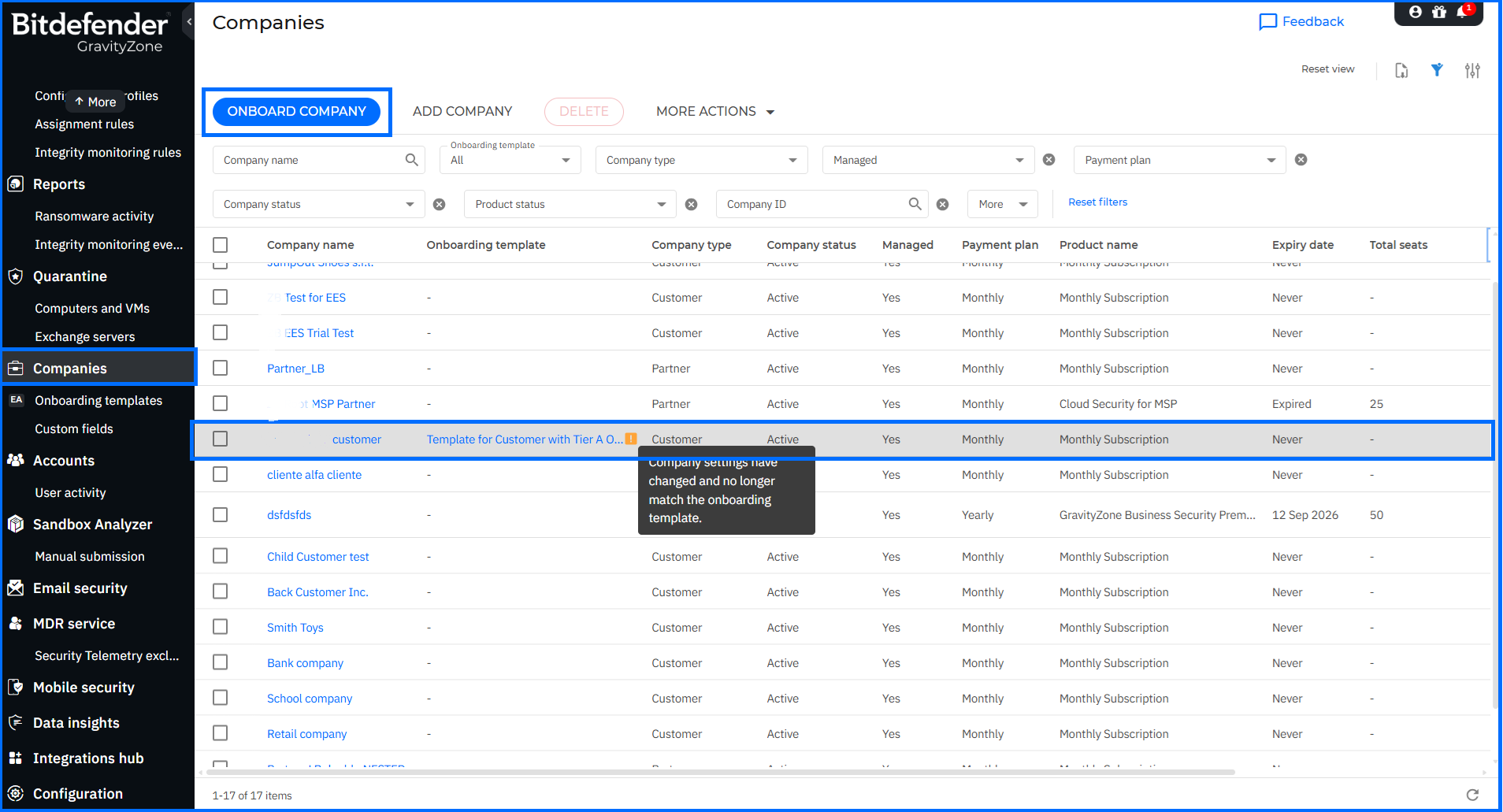
Managed Service Providers (MSPs) operating in GravityZone manage security for multiple customer companies under a single partner account, provisioning each with its own licensing, policies, and configuration. The Simplified Customer onboarding continues with improvements to template visibility and enforcement.
On the Companies page, the Onboarding company button is now displayed for all partners, including those not enrolled in the Early Access program, though enrollment remains a prerequisite for the button to become active. A warning icon and tooltip now mark any company whose configuration no longer matches its onboarding template. The page also supports filtering companies by template, with the filter accepting URL-based linking from the Applied on field in the side panel on both the Companies and Onboarding templates pages. Selecting a template name from either page opens a side-navigation panel presenting the template details in read-only mode. Applying a template to a company now enforces the associated policy on all targets in that company, rather than on newly provisioned targets alone.
For comprehensive insights into MSP management in GravityZone, we invite you to watch our masterclasses here.
MSP Product Trials
Product trials give partners a way to evaluate GravityZone add-ons on a managed company before committing to a subscription. The most consequential change in this release is what happens when a trial reaches its end date.
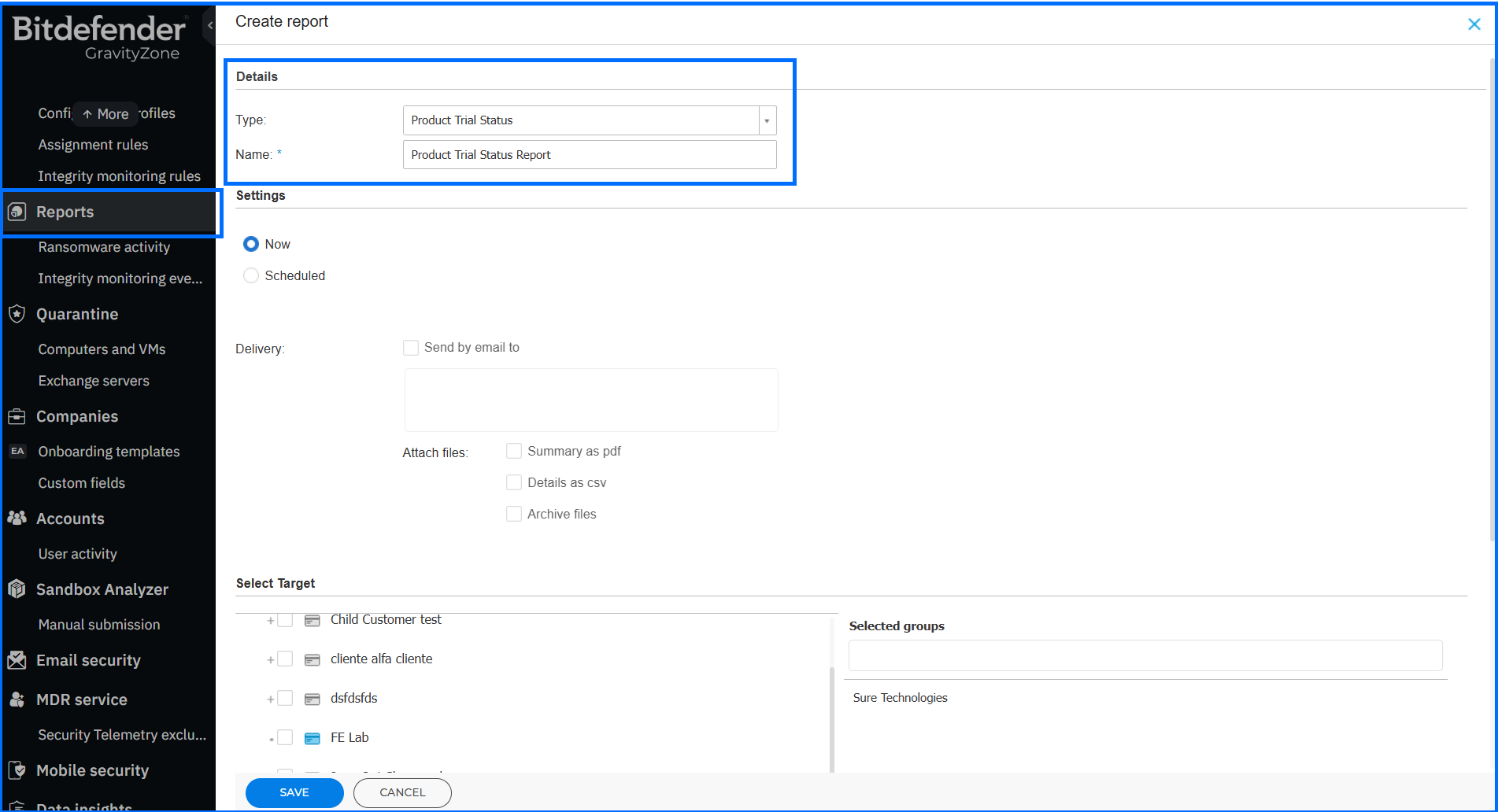
A trial that is not stopped before expiration is now converted to a paid subscription. The automatic conversion behavior is stated during trial license configuration, before the trial begins. A reminder is sent seven days before expiration. Partners can track the position of every trial through the Product Trial Status report, which lists start and end dates and current status — Ongoing, Stopped, or Converted. The trial end date is now a billing date, and the reminder and the report are the two points at which a partner can act.
Four further changes cover trial scope and access:
-
Free product trials section. The Products hub section in Customer-type company settings has been renamed to Free product trials.
-
PHASR trial availability. Proactive Hardening and Attack Surface Reduction (PHASR) proactively hardens systems by analyzing user behavior to prevent Living off the Land (LotL) attacks. It is now available as a trial for companies using the Secure, Secure Plus, or Secure Extra protection models.
-
Concurrent trials. Multiple trials can now run at the same time on a single managed company. A newly started trial covering an add-on already included in an active trial stops and replaces that trial.
-
Start trial availability. The Start trial button is disabled for companies with zero licensed endpoints in the current month.
For comprehensive insights into MSP management in GravityZone, watch our masterclasses.
API Enhancements
Bitdefender Control Center APIs enable developers to automate business workflows. These APIs are exposed via the JSON-RPC 2.0 protocol. You can find usage examples and documentation in our Support Center, located here.
This update introduces two new methods and extends existing methods across Companies, Incidents, Licensing, and Network areas.
Companies:
- The createCompany method now supports the manageAiSpm and manageAiSpmResell parameters for companies using the AI Visibility and Control add-on, and supports the Secure Essentials protection model.
- The findCompaniesByName method has been optimized for maxResults: 1 queries, reducing response times for exact-match company lookups.
Incidents:
- A new changeIncidentPriority method modifies the priority assigned to Endpoint and Organization incidents. Priority changes are recorded in the Incident history panel and the User activity page in GravityZone Control Center, with MDR analyst actions attributed to an MDR Service account.
- A new lastIncidentChange field is returned by getIncidentsList, getIncident, and getIncidentsByIds, carrying the timestamp of the most recent change to an incident from any source — endpoint and technology updates as well as user actions such as status, priority, assignee, or note updates.
- The getIncidentsList method accepts changeStartDate and changeEndDate in the filters object and sortBy in the options object, both operating on lastIncidentChange.
Licensing:
- AI Visibility and Control and the Secure Essentials protection model are now supported across setMonthlySubscription (enabling or disabling for existing companies), getLicenseInfo (availability and model returned for eligible companies), getMonthlyUsage (returning the aiSpmMonthlyUsage parameter), and getMonthlyUsagePerProductType (returning usage per product type).
Network:
- A new runGatherLogsTask method triggers log collection tasks, exposing the full set of log types available under Troubleshooting > Gather logs in the endpoint details. The method accepts a list of target endpoints, initiates collection, uploads results to an AWS S3 bucket configured as for runLiveSearchQuery, and returns a task ID for tracking.
- The firstSeen and isIsolated fields are now returned by getNetworkInventoryItems, getManagedEndpointDetails, and getEndpointsList. The getNetworkInventoryItems method additionally returns AI Visibility and Control status and the Secure Essentials protection model.
For comprehensive insights into automating workflows with the Control Center API, watch our masterclasses.
Learn More About Bitdefender GravityZone
The Bitdefender GravityZone security platform is a unified solution across prevention, protection, detection, and response, ensuring the ongoing security of organizations around the globe.
Learn More
Explore the Bitdefender GravityZone unified security platform
Request a demo and start a free trial